I really like the combination of MPC Renaissance hardware with the MPC 2 software DAW.
During the last updates it has become so much flexibility and still the feeling of a hardware mpc with the awsome pads and knobs. I always loved the 3000er design and the hardware of the Renaissance is feeling pretty solid and high quality.
The original software was really limited and more like a pc version of the orignal mpc os.
With the new MPC DAW you get all the flexibilty of VST's, MIDI and Audio routing what we need in modern production enviroments. For example normally I'm using the MPC Renaissance audio interface with 4 outputs (2x Stereo) routing into my hardware mixer for using some external equipment. If I need more then 4 outputs, I can swap the audio interface for my motu (+3 adats + daisychain) and now I got 40 analog outputs! How amazing is that? You can stay also "ITB" and using software plug-ins as well.
You got 4 MIDI In and Outs and I connected my Akai Samplers S950, S1100 and S3000. For me the timing is really great. And you can simultaneously use all Midi Interfaces. I remember it was not working at some older releases but they fixed that in an update.
I need to say, not everything is perfect and there are still some small bugs with the DAW and some VST's but it's not a big deal. I dont like there is no usefull metering for the mixer and you need take care about audio levels.
Some things are really confusing and maybe different than in other DAW's. So I want show you here some tipps.
1. Recording Audio
Recording audio was really confusing for me! If you got many inputs it's even more confusing. For the case you are using a motu or any other interface with 2 mic preamps, we need to care about that input 1/2 are not the line inputs 1/2 of our interface. They are the mic preamp inputs! So analog 1/2 input of my motu is input 3/4 in the software. 😏
· Create audio track
· Select input: 3 /4 is analog 1 /2
S/PDIF 1-2 is 11/12 (for my interface)
· Go to track and click red dot
· Record
2. MPC Expansion Content
The content
is stored in C:\ProgramData\Akai\MPC\Content
Now we manually
copy the content to another location.
Edit the
file TheBank.txt in C:\ProgramData\Akai\MPC\TheBank
You
delete the path C:/ProgramData/Akai/MPC/Content/TheBank/Samples
And type in
your new one:
H:/Audio Programm Data/Akai/MPC/Content/TheBank/Samples
Important
use the Slash “/” not a backslash “\” and at the end of the path “/Samples”
Otherwise
it won’t work!
Samstag, 27. Juli 2019
Using an Akai S3000 today
Music is always a feeling, and things which feel good we
like. Akais have ever been a dinosaur of another time and today they seem a bit
nostalgic. Creating and storing sampling librarys are a lot of work and takes
time. But especially in times like now for me it is more important to get an
indivudal sound, cause never else than today was so cheap and easy producing
music. These old Akais can give your production a special flavour.
What I really like on the S3000 is the build quality, the
XLR Outs and that it sound equal to a MPC30000. Hihats can shine and sound really amazing
fired out of an S3000. Some users describe the Akai S3000 sounds like studio
standard chrystal clear, but there are some differences in the higher frequencies.
For me it’s like a little saturation and high freq. cut. A drum mix from a
S3000 sounds even little compressed. The sharpnes of the hihats can be enorm
reduced, kicks and snares have the right punch. I enjoy using the S3000 with
external gear like my Alesis 3630 compressor, Soundcraft eq + Ghost preamp and
some outboard reverbs from Alesis and Lexicon. It is a very easy routing with a
hardware sampler and the worklow is also fast and more creative for me than
ITB. It is a totally different workflow producing and aranging a track what
makes the main difference. Indeed the S3000 original (non XL) sound is as thick
as the MPC3000, because it has he same converter.
For drum sequencing I
am using my MPC Renessaince which is a great combination for hardware samplers.
The timing is absolutly stable and the swing got the typical AKAI mojo. For me
the best mix of a modern DAW and pad programming.
Technical
The internal data processing of the S3000 takes place with
28 bits. As a sampling rate 44.1 and 22.05 kHz are available, the lower rate is
initially intended for corresponding recording material below 10 kHz. However,
also to save space, because at 44.1 kHz, there are just 11.14 seconds recording
capacity for stereo samples and 22.05 at mono. The cause of the shortage: The
factory only 2 MB RAM are installed, which can be expanded with up to a maximum
of 32 MB. 3 minutes of stereo sampling in and almost 12 minutes if it is 22.05
kHz and mono. Which explains why the AKAI samplers were used in their heyday
for dance and techno productions to manage longer vocal recordings than
samples. With the resample option you can also transform your existing data
into other sampling rates. The S3000 manages up to 255 individual samples. For
the sound shaping itself is a Synthesizer Engine ready, whose parameter set is
manageable, but which serves well for most purposes. In particular, fine-tuning
of instruments of all kinds can be done with it, for which there is a digital
12 dB / octave filter that can even a little resonance. It continues with two
envelope generators, one regularly used for volume and the other for filters.
The display is alpha-numeric and graphical, which makes the often somewhat
laborious setting in sample editing comfortable.
Upgrades
Usefull upgrages are new EL foile, or a LED display.
For storing your samples a usb /sd floppy emulator makes
sense. I only updated my s3000 with a SCSI card for using my Iomega zip. Also
Interesting if you got a SCSI CD Rom, loading some Multisample libraries in the
Akai.
Additional
The OS v2.0 upgrade primarily focuses on resolving issues caused by
Akai’s previously poor non-compliant implementation of the SCSI protocol in its
system code. This is especially important for users out there that wish to use their
S3000 with MESA II as well as Recycle 2.0.
You can upgrade to OS v2.0 via system boot floppy or image from card
reader / zip and with a new system Rom available from ebay.
Ram
You can max the ram with 32MB. These days its very hard to
find some single boards. If you are lucky you can get some mutec dmc-08 boards
with 8MB. While you are using the S3000 for some simple drums its nor important
to maximize the ram.
Specs
Polyphony - 32 voice
Sampler - 16 Bit, 44.1 or 22.05 kHz, 8MB to 32MB,
capacity up to 255 samples
LFO - (2) LFOs
Filter - Digital moving low-pass filter (-12 dB/octave
with resonance); Optional upgrade to Digital moving hi-/band-/low-pass filter (-12
dB/octave with resonance) for 3200 models.
custom Female Large 4-pin Molex to Female Small 4-pin Molex
The internals of the StarTech.com unit is an Addonics AD44MIDECF. StarTech.com adds a slot for the card and a metal housing.
The only CF drive that have been able to get to work is a Pretec 16 GB 233x Series Compact Flash drive. I was able to find someone selling one on eBay. Other than eBay, they seem to be sold out everywhere.
Per Muser on GearSlutz, the reason why this CF card works is the following:
233x is 233 times 150KB per second. the 150 was the designation for CD ROM Audio at 44.1 16bit .. per second KB.
The Akai will likely want to see this kind of speed, as its hard disk formatting specification mirrors that of a sample CD.
I also had to cobble together a custom Female Large 4-pin Molex to Female Small 4-pin Molex, soldering together parts from two other Molex cables I had.
I read so many posts about the MPC Ren, Vintage
Mode and the comparison with the MPC3000. Let's find out whats goin on with the MPC Ren and converters.
Akai and SOS was writing: “In addition, the analog
output circuitry in MPC Renaissance is identical to the highly regarded MPC3000.”
So what does mean? Akai is very inaccurate in describing which part of the output circuit is identical to the MPC3000. A guy from mpc-forums found out, that they only copied the anti aliasing filter behind the digital analog converter (dac) and the output jacks. Basically a two pole low pass filter without any resonance, and with its -3dB point at 26 KHz. The MPC3000 sound is a combination of the digital filter, the 18 bit Burr Brown dac and the anti aliasing filter with the opamps. We dont know what kind of dacs were used in the MPC Ren.
Getting started:
So my first test was checking the sound of the
MPC Ren DA converter and the sound directly from my external motu audio
interface. It’s nearly the same sound, nothing special with the Ren DA
converters. So I can’t notice a big difference in the sound, if im using my motu
soundcard and bounce a track or using the DA converters of the MPC Ren and
record it.
If you are using analog summing, or analog
master bus, the sound is quite different for sure, but that’s another story.
MPC 3000 AD DA Converters:
The early s-series samplers used the MPC3000
engine and AD and DA chips and output boards they have a crisp analog sound.
S3200
S3000i
S3000
CD3000i
S2800i
S2800
MPC3000 DAC
Let's have a look at the electronic components, what makes this crisp MPC3000 Sound.
In the output section there is an 8x oversampling digital filter, followed by the 18Bit serial digital anolog converter. I saw that the MPC2000XL is using almost the same ICs in the output section.
The PCM69A is a dual 18-bit DAC low cost, dual output 18-bit BiCMOS digital-to-analog converter utilizing a novel architecture to achieve excellentlow level Performance.
PCM69A digital offset occurs at bit 4, making it an excellent choice for digital musical instruments and audio DSP.
Most of these DACs utilize a one-bit DAC with “noise shaping” techniques and very high oversampling rate to achieve the digital-to-analog conversion. Basically, the trade-off is from very accurate but slow current sources to one rapidly sampled current source whose average output in the audio frequency range is equal to the current desired. Noise shaping insures that the “undesirable” frequencies associated with one-bit DAC output lie outside the audio range.
These “Bitstream”, “MASH”, or one-bit DACs overcome the low level linearity problems of conventional DACs, since there can be no major carry error. However, this architecture exhibits problems of its own: signal-to-noise performance is usually worse than a similar conventional DAC, “dither noise” may be needed in order to get rid of unwanted tones, a separate high-speed clock may be required, the part may Show sensitivity to clock jitter, and a high-order low-pass filter is necessary to filter the DAC output. The PCM67/69A is a cross between these two architectures. It includes both a conventional laser-trimmed, current-source DAC and an advanced one-bit DAC. The conventional DAC is a 10-bit DAC where each bit weight has been trimmed to 18- bit linearity. The one-bit DAC has a weight equal to bit 10 and employs a first-order noise shaper to generate the “bitstream.”
TOTAL HARMONIC DISTORTION + NOISE
A key specification for audio DACs is usually total harmonic distortion plus noise (THD + N). For the PCM67/69A, THD + N is tested in production as shown in Figure 12 (Datasheet). Digital data words are read into the PCM67/69A at eight times the Standard compact disk audio sampling frequency of 44.1kHz (352.8kHz) so that a sine wave output of 991Hz is realized. The output of the DAC goes to an I-to-V converter, then to a programmable gain amplifier to provide gain at lower Signal output test levels, and then through a 40kHz low pass filter before being fed into an analog type distortion analyzer.
(Extracted from: Burr Brown PCM67/69A Datasheet U.S.A. August, 1993 )
Akai was also using several converter chips. If someone got some more infos about the Asahi convertes (Datasheet, in which samplers Akai used em?) please send me an email. In the MPC3000 service manual I only see the PCM69.
Asahi Kasei AK5328VP - AD converter Japan
Asahi Kasei AK5326VP - DA converter Japan
PCM69AP-4 – 18 bit serial input DA converter
PCM69BP - BVR - Brown Corporation Advanced 1 Bit BicM05 Dual 18 Bit Digital to Analog
The NJM5532D is a high performance dual low noise operational amplifier.
It shows better noise performance, improved output drive capability, and considerably higher small Signal and power band-widths.
The M522OL is a dual low noise operational amplifier, designed for a preamplifier in audio equipment of stereo and cassette tape decks. High gain and low distorition, suitable for application as an equalizer and tone control amplifier of stereo equipment and tape decks.
Test construction:
Test files: WAV 16 bit 44,1kHz Recording: DA Ren and DA MPC3000, Motu AD 24 bit 44,1kHz
Sample converter: Awave Studio (for the MPC3000)
Test Summary MPC Ren Vs.
MPC3000:
The MPC3000 sounds very analog and warm, great
transients on the snares and hihats. The stereo image was reduced cause the samples converted to mono.
MPC Ren Normal Mode: Very close to the original
sample, neutral sound. Sharp hihats and snare like the original sample.
When I was checking the metering, I noticed
that the Ren sounds a bit louder than the MPC3000, but the RMS loudness is 1dB lower.
I thought the same like a guy from mpc forum, Akai using a software compressor/
limiter in the master chain.
MPC Ren Vintage Mode MPC3000: Very subtile difference
MPC Ren Vintage Mode MPC60: Bass enhancement,
more bottom end, but not even close to MPC60 sound. I got a S950 here in the
studio. Maybe I will post the MPC60 and even the MPC2000XL beat.
Conclusions:
Most people like the Ren and say it sounds very
neutral, equal or even better than any hardware MPC. I really share this opinion,
it’s a great neutral sounding MPC. I’m only missing the creamy and crispy sound
of the old Akais. But that’s the point why I still work with my old S-Series.
Sounds like magic, pressing one button and you got MPC3000 or MPC60 sound. We only know, its a pure software emulation (dsp algorithm).
Let’s see what the future bring us, maybe
someone is opening the Ren and can tell us what kind of converters used in the output section. Akai said: "In addition, the analog output circuitry in MPC Renaissance is identical to the classic MPC3000."I would say: next time ask Universal Audio how that exactly works :) cheers
With the helpof this blogwehave been able torepair someoldakaisampler. I hopethey workanother 20 yearsflawlessly:) Sinceevery problemarepairisdifferent, I'll post some details.
Daniel de Graaf from NYC wrote me:
lovely tutorial on replacing the floppy drive in the akai s1100. I have followed your instructions and replaced a 235HF-270u with a 235HF-217u like in your tutorial. I have matched the pinout too etc
The issue I have is that the drive will read discs but not format, write, or load to RAM . I get a few errors "DISK NOT READY!" and "NO DRIVE" and "NO DISC" ... Also I only have s950 discs and a few blank discs. It will read the s950 discs and see programs and samples, but the akai freezes when i try to upload those samples with "P+C".
the electronic retailer I bought this from assured they are all tested to write,read, and format on PCs before they are sold. She mentioned there may be a firmware issue happening.
Do you have any idea how and if I can fix this? I also had her ship me out a few other floppy (another 217, a 240?...) drives to test.
I answered him:
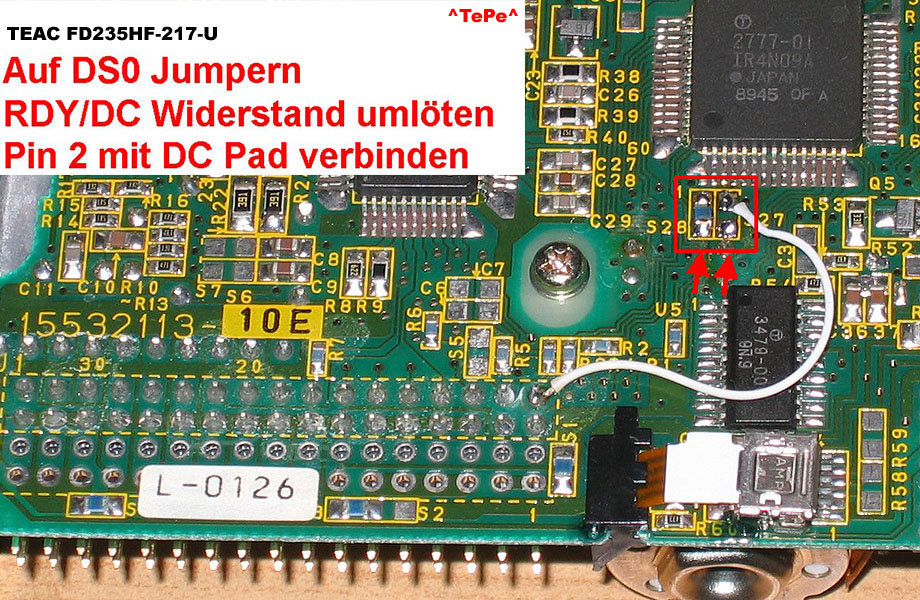
sounds like the jumpers not set correct. The problem is, there are different versions of the 235HF-217-U. Seems like later versions don’t have the DC/RY Jumper so you have to solder the pinout.
The jumpers/sliders to change are 2: one selects which drive enable line it will use and one selects what line will be used for floppy detect. The Drive Select jumper is rather easy to find as it is usually labeled "DS": DS0 (for Drive Select 0) and DS1 (for Drive select 1) - you must move it from DS1 to DS0. Now for the trickier part: you have to change the Floppy Sense or Disk Change to Ready signal. This may be labeled DC/RY. This is a deviator type jumper or slider (usually 3 pins, 1-2 for one setting and 2-3 for another) but can also be a 2pin jumper *or* a "rotatable" jumper if located in a jumper matrix (check 1st pic). This means you need to rotate a jumper left or right 90 degrees from it's default position around one of it's 2 pins. This simply modifies the pin 34 signal (which is usually Disk Change) and reassigns it to send the "Ready" signal.
Well that's it. If you manage to reconfigure these 2 settings, you have a perfectly compatible AKAI (and Amiga) floppy unit which you can use again.
One last note: if you don't have any reference on your floppy for this DC/RY jumper, you may discover it by trial and error - I did this many times as it took me less to try the 3 or 4 settings than to understand where the jumpers went and study the pcb. A good hint on knowing that you hit the right jumper is that when you move it your AKAI shouldn't report a "floppy not ready" or similar error when you have a floppy inserted. Infact line 34, which the AKAI interprets as the Ready Signal is (before the re-configuration) the Disk Change signal. As they behave with inverted logical values (one is active low the other active high) if you leave no disk in the drive, the AKAI will think that the drive is ready and try to read from it! So this will give you some feedback on the jumper you are toggling or moving if it stops doing that (you may have hit the jackpot).
The sources of the Infos are these other great sites. I really want say thx to all people who sharing so usefull Information.
Im using MPC Long years ago and I really love my MPC2000XL. But now its 2014 and I had to try out the MPC Ren. First of all I need to say, this piece of gear is looking awsome! Very good quality of used materials with a smart vintage touch.
But... where is my lovely MPC sequencer? Why I cant rename my Tracks on the MPC (without the daw)? why is everything new and the great mpc workflow has changed? I better stop here or maybe I will start a shitstorm...
I really thought the daw Integration within pc usage is an improvement of the old mpc workflow. Its not that bad but its something new and it will need some time for oldschool mpc users like me :)
Install the MPC Expansion Content
Why I Need to install the Expansion content on my C drive? You dont need! Here is the hack!
Installing
the MPC Expansion „The Bank“
If you were
running the latest MPC Software 1.6 x64 Bit first of all you need to install
the bank expansion from the DVD. It won’t work yet because you need to install
the x64 Bit update first.
There is no
location for the content you can choose. All will be installed on your c:\
Partition.
The content
is stored in C:\ProgramData\Akai\MPC\Content
Now we manually
copy the content to another location.
Edit the
file TheBank.txt in C:\ProgramData\Akai\MPC\TheBank
You
delete the path C:/ProgramData/Akai/MPC/Content/TheBank/Samples
And type in
your new one:
H:/Audio Programm Data/Akai/MPC/Content/TheBank/Samples
Important
use the Slash “/” not a backslash “\” and at the end of the path “/Samples”
The Akai S950 is known for its rich, powerful, warm, dirty sound that makes him even today still a popular studio tool. Apparently the same AD converters have been installed as the 60th. MPC Many producers tell him also: "It sounds like old vinyl. Who knows Premo's, or Pete Rock's drum samples and may (especially the hi hats and snares) will understand what is meant. Many hip-hop and R & B producers use it in connection with an SP 12 / 1200 allude to a longer able to sample. I use it for example together with my S1100 and my MPC 2000XL or Cubase as sequencer.
The S950 is the advanced version of S 900 and also works with 12-bit technology, but has a higher sampling frequency of up to 48 kHz and more memory Ram. By default, the S 950 750 kbytes of RAM, which can be "upgraded" to up to 2.25 MB's (installation of up to two EXM 006). The built-in 3.5 "floppy drive handles both DD and HD floppies. In addition to this, another IB-105 are incorporated Atari disk interface that the connection of a 60 MB SCSI 1 hard drive. Like his predecessors, he also has The indispensable for studio use eight individual outputs. An editing options are available in the S 950 is a low-pass filter, two envelope generators and an LFO acting on the pitch ready. The display offers two times 40 characters. The rack unit (3U) also impresses with its load-While - Play feature, which plays while the S950, new sounds can be loaded again, if the total RAM memory is not consumed. Because of the individual outputs of the S is 950 particularly popular as a drum sampler. As the S700, so also has the S950, the voice-out jack to connect there, such as an Akai VX 90 or another synthesizer to influence the samples of the finishing options.
The S950 was the first Akai sampler to implement time stretching, enabling you to alter sample length without altering pitch. Considering the S950's continued popularity as a drum-loop sampler, that capability proved crucial to its success. If you stray too far from the original sample length, recordings begin to sound a little metallic and artificial, which might be the result you're aiming for.
A vast range of Akai and third-party sounds are available for the S950. Impressively, the S950 is downwardly compatible with S900 disks and upwardly compatible with S1000 disks. Although the S950 converts the S1000's 16-bit data to 12 bits and stereo to mono, most samples transfer extremely well.
Hello, and welcome to my floppy drive replacement tutorial. I did this on my S1100 and its really easy if you dont got 2 left hands. You dont need to be a technican, but be carfull of everything what you are doing. First of all, remove the powerchord. Dont touch any chips on the board, you can easy damage them with static voltage. If you got, use antistatic equipment.
01. Open the S1100, loose the screws from display panel on the top and bottom. Remove power and data cable from floppy drive.
02. Pull the front panel, so you can see the floppy holdin screws.
03. There are 3 screws holdin the floppy drive on case, loose them.
04. Now pull the floppy drive diagonal backwards. Be carefull!
05. Now you got the floppy in your hand. Good job :)
06. Loose 4 screws from the drive holder. Be careful of the power switch.
07. This was my original floppy drive, a Teac 235HF 217 U. You are lucky if u got the same replacement drive! If you dont got the same, you can buy a Akai drive for 70$ on Ebay or you look for an old drive which works with the akai sampler.
Here is an Amiga mod for Sony 920 MPF z/121 floppy drives using in Akai S1000/S1100 samplers, tested by my friend Takis (Zombie).
This is what i came
up with, i did see some schematics on a Czech site for the "Z" series but they
did not work properly. I tested their fix using "The killing Game show" which
took great delight in refusing to load the actual game with their fix. My fix
works fine. I do not have X-copy so I'm unable to check that function, but i am
pretty confident that it will work fine.
The model i used
is the Sony MPF 920 z/121 which is still on sale in stores (and also the z/131
which i have not seen).
The
mod itself is pretty easy, 2 wires, cutting a trace and moving a Zero ohm
resistor. The low res pic is shown below and the hi-res pic (Link below) shows
everything you need to know.
Here
is the HD disable pic (This forces the drive to treat all inserted floppys as
Double Density) AKA 880k Amiga discs.
As you can
see we just need to short the two points on SW3.
Here is what is
needed to be done in order for the A1200 case to close properly. All the marked
area has to be removed or bent back in order for the top case to fit properly.
It is really easy to do, just use a dremel or hacksaw blade on the left and
right side and then use a pair of pliers to bend the metal up and
back.
and here is if
finished and fitted. Notice that the button had to be trimmed on the left side
so it didn't interfere with the top portion of the case. The button is a little
on the short side, but works ok. Overall the drive is a lot quieter than the POS
that was in there originally. I'll probably fashion a button extension piece out
of scrap plastic and glue.
The MPC-60 is the music
production studio that has single-handedly taken over the Rap and R&B music
genres as the main instrument of HipHop production. Designed by Roger Linn
(Linn Drum), the MPC-60 is a one-box-does-it-all sequencer-sampler workstation.
The built-in sequencer is
very complete and professional. There are 99 tracks per sequence, 99 patterns,
and 99 sequences that can be created, edited and stored in the MPC-60 with
ease. Most artists create their patterns in real-time adding drum parts to a
beat-loop spontaneously creating a groove that captures the vibe. These
patterns are varied and chained into a sequence. Full MIDI, SMPTE and various other
forms of external control prepare the MPC-60 for any studio situation.
The Sampler section is
lo-fi but highly respectable. Its 12-bit sampling at 40KHz is pretty good.
Sample editing, looping and transforming is simple to do. And finally, there's
even a built-in drum machine for extra groove! Finally, the 18 voices of
polyphony should be plenty of room for anyone who wants to create HipHop on the
machine of professional artists worldwide including Apollo 440, BT, Jean-Michel
Jarre, DJ Shadow, and A Guy Called Gerald.
In 1991 the MPC-60 mkII was
unleashed. It wasn't much different, the casing and a head-phone jack were new
and either machine is still very useful for today's aspiring musicians.
Akai S 900 / S 950
The S 900 / S 950 is known for its rich ,
punchy , warm , dirty sound , which is still a popular studio makes him even
today instrument. Apparently
the same AD converters have been installed as described in the MPC 60 Many
producers tell him also: " It sounds like old vinyl" . Who
's Premo or Pete Rock's drum samples know and like (especially the hi hats and
snares ) will understand what is meant. Many
hip-hop and R & B producers also use it in conjunction with a SP 12/1200 to
allude to longer samples . I use it
, for example, together
with my S1100 and my MPC 2000XL .
The
S950 is the advanced version of the S 900 and also works with 12-bit technology
, but has a higher sampling frequency up to 48 kHz and uses more memory Ram . By
default, the S 950 750 Kbytes of RAM , which can however be upgraded to up to
2.25 MB ( installation of up to two EXM 006) . The
built-in 3.5 " floppy disk drive handles both DD as well as high-density
disks . Moreover, even an IB -105 Atari hard disk interface can be installed ,
which allows the connection of a 60 MB SCSI 1 disk. Like his predecessors, he
has also the
indispensable for studio use eight individual outputs. an editing options are
available in S 950 , a low pass filter , two envelope generators and one acting
on the pitch LFO ready . the display offers two times 40 characters. the rack
unit ( 3U ) impresses also with its Load -While -
Play function , ie, while the S plays 950 , new sounds can be loaded again ,
provided that the total RAM memory is not consumed Because the individual
outputs of the S 950 is especially popular as a drum sampler Like the S 700 ,
so . . also
has the S 950 the Voice Out jack to there to connect eg a VX 90 or another AKAI
synthesizer to influence the samples of the post-processing options .
Emu SP 1200
I know it’s not an Akai J but
hey, this machine is definitely worth about to write!
The SP-1200 was THE drum
machine & sampler combo of legendary status among old school rap and hip
hop artists from the eighties and nineties. It is similar to today's Akai MPC
samplers - it is a sampler plus drum machine. It has limited sampling specs: 22
kHz and 12-bit resolution. However the dirtiness of that sound is great for hip
hop and house music. They say it sounds like "old vinyl"... It
features groove quantizing and a disk drive for sample storage. As an upgraded
version of the 1985 SP-12, the SP-1200 focused on its coolest feature -
sampling. The preset drum sounds of the SP-12 were omitted, leaving room for up
to 32 user samples of your own custom sampled and edited drum sounds.
Although this machine was
originally released in 1988, E-mu has reissued them again and again due to
popular demand. They continued producing them until they ran out of the SSM
filter chips they used, around 1998. It was just too legendary to give up as it
was THE beat machine for old-school rap and hip hop! Pictured above is the
final reissued version in 1997 with the cooler looking all-black case. With the
SP-1200 it's easy and fun to grab those sliders and tune or tweak your sampled
drum sounds all around! It is used by Roni Size, Todd Terry, Freddy Fresh, Daft
Punk, Phil Collins, and The Prodigy.
Akai MPC 3000
The MPC-3000 is a new and
improved version of the classic MPC-60. It is a sequencer-sampler powerhouse
that functions as the heart of any studio that produces HipHop, Rap, R&B,
and even techno. It is usually used as the main percussion groove instrument.
Sample your beats, sequence your beats, and edit your beats all on the
MPC-3000.
It's a great Sampler:
16-bit stereo 44.1Khz sampling with 2 to 16 MB of memory and full editing
capability. In fact, its sampling specs are equivalent to most rack-mount type
samplers, proving that the MPC-3000 is a professional instrument.
It's an excellent
Synthesizer: Sixteen dynamic pads with velocity and aftertouch, great drum
sets, analog-like VCF filter sweeping with resonance, analog envelope control
and 32 notes of polyphony. Except for the drum sounds, it does not feature a
built in oscillator or synthesizer engine. But your samples can be shaped and
colored by the analog-style edit functions for creating lo-fi sounds, filter
swept pads and drum loops, and other strangely modulated effects. This
effectively makes the MPC-3000 as powerful and editable as any synthesizer.
It's also a great
Sequencer: 20 Songs, 99 sequences, 99 tracks, and up to 75,000 notes. It has
total MIDI implementation, very sophisticated sequence editing, and SCSI + disk
drive storage. The MPC can be the Master or just another sampler in your
current MIDI studio. Professional MIDI, Sync and Time Code features are also
onboard.
The MPC-3000 is not just an
instrument, it's an entire Music Production Studio! With seemingly limitless
features it is vastly expandable. SCSI storage provides limitless sample
storage. The sound quality and sequencer quality is superb. These are expensive
machines and with good reason. It's used by many famous artists including Puff
Daddy, BT, the Crystal Method, and The Chemical Brothers.




 that it will work fine.


